GATHERING
3×
General resources, dispensers and pickups.
3X • MONTHLY • CUSTOM EVENTS • CUSTOM CONTENT
Survive the fallout. Build your legacy.
A familiar island. An entirely different Rust experience.
SERVER SETTINGS / PLAN YOUR WIPE
GATHERING
General resources, dispensers and pickups.
MINING QUARRIES
Quarries gather at 3× with a 5-second resource tick.
SURVEY RESOURCES
Survey resource multiplier.
EXCAVATOR
3 second resource tick; no separate resource multiplier configured.
ECONOMICS
Economics balances are configured not to wipe on new save.
BACKPACKS
Backpacks are configured not to clear on wipe.
TRADING CARDS
Collector album and card bags reset on wipe.
GEM BAGS
Gemstone bag contents reset on wipe.
FRESH FROM THE ISLAND
Fly higher. Recycle smarter. Dig deeper. Dive for more.
WHAT’S NEW TO THE ISLAND ↗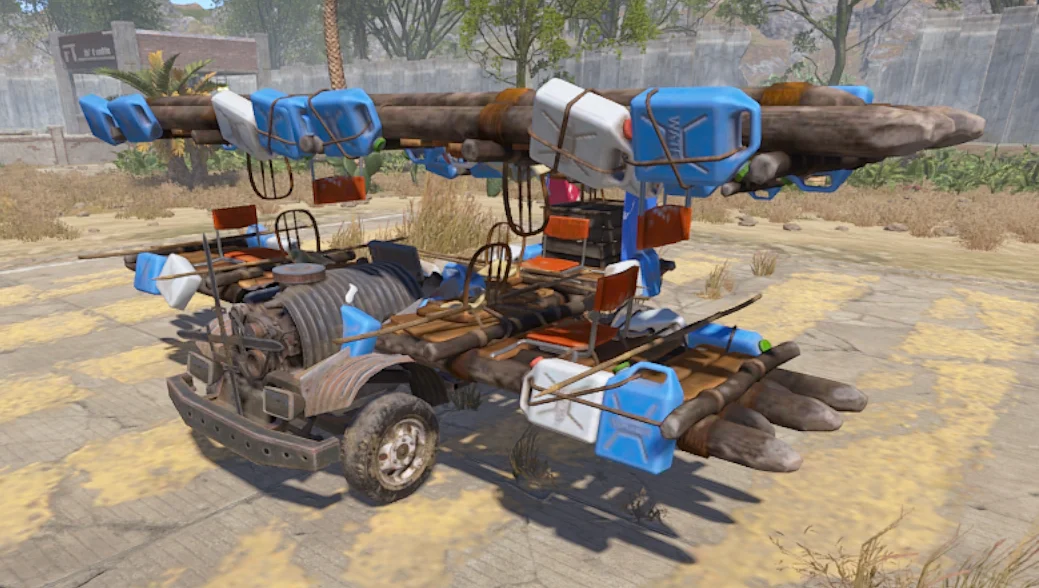
Trade the road for the runway. Take off from Airfield, explore the island from above and make every landing part of your survival story.
EXPLORE THE ADDITION ↗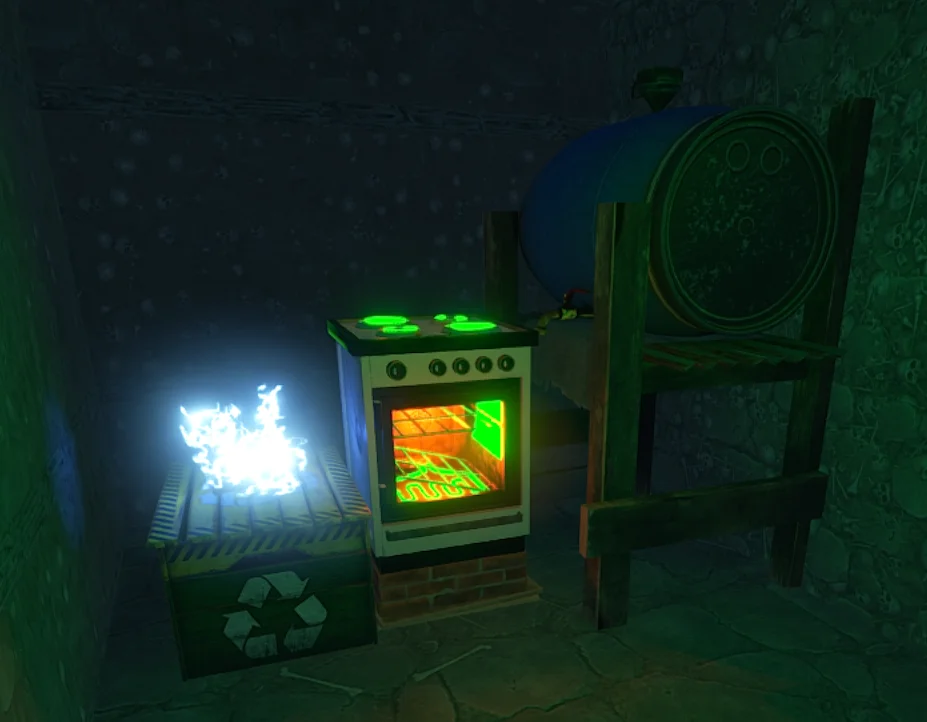
A rare supply-drop find with a serious payoff. Power the reactor, load your components and watch the Tesla coil crackle as advanced-component rewards roll in.
EXPLORE THE ADDITION ↗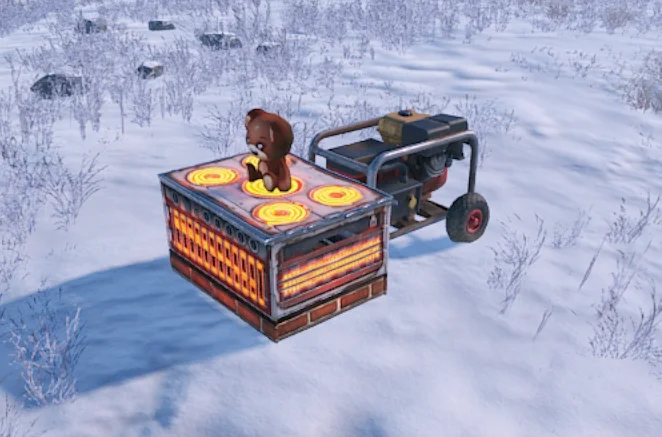
Build a portable mining operation wherever the right biome takes you. Feed it Low Grade Fuel and let the drill gather resources while you plan your next move.
EXPLORE THE ADDITION ↗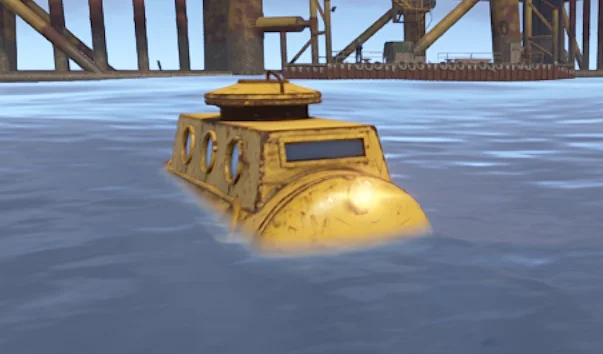
Dive beneath Large Oil Rig and turn the seabed into your next payday. Extract crude oil, chase bonus diesel and race rising heat, radiation and circling sharks. Bring a partner, keep your fuel topped up and know when to make your escape.
EXPLORE THE ADDITION ↗01 / THE NUKE ISLAND EXPERIENCE
Heavily customised. Built for progression.
Our 3x monthly server brings new objectives, unusual discoveries and more reasons to get out into the island.
THE ISLAND KEEPS EVOLVING
More custom features. More reasons to return.02 / SURVIVOR FIELD MANUAL
From your first flight to advanced recycling: explore the systems that make Nuke Island different. Choose a topic to open its field notes.
Field notes match the supplied in-game ServerInfo guide. Server settings can change; check the in-game guide and Discord for the latest announcements.
The Biplane plugin adds fully flyable aircraft to Nuke Island. The plane has a working engine, fuel system, pilot controls and an on-screen dashboard showing speed and fuel. The current aircraft is configured for a maximum speed of 35 and a maximum flight height of 300. Treat it like a real vehicle: get the engine running, build speed on clear ground, then use the flight controls to climb, turn and land.
A FREE Biplane can spawn at AIRFIELD at the server-configured aircraft spawn point. There is one Airfield free-plane spawn point, so this is a shared world vehicle rather than a personal guaranteed plane. If somebody has already taken it, do not expect another plane to stack on the same spawn. The Airfield preset starts with 300 fuel when spawned.
The AIRWOLF VENDOR is located at AIRFIELD. Talk to the vendor and choose the Biplane purchase option. The standard Biplane is configured at 750 SCRAP. After a successful purchase, your aircraft is created at the dedicated Airfield runway purchase-spawn point. The runway must be clear, so move aircraft away rather than blocking the delivery area.
The Biplane uses vehicle-style engine/fuel mechanics and spawns with 300 fuel. Use W to apply forward power while the engine is running; mouse movement controls the aircraft's flight attitude, with A/D also contributing to turning. Build speed before trying to climb and give yourself plenty of room to land. WARNING: biplanes can be targeted by Homing Launchers, player-deployed SAM Sites and monument SAM Sites, so flying into defended airspace is dangerous.
The aircraft includes a small 3-slot onboard box. The plugin also allows biplanes to be picked up with a HAMMER; empty the aircraft's containers before attempting pickup. Look after your plane and avoid abandoning it on the Airfield runway or vendor delivery point where it can prevent other aircraft from spawning safely.
Nuke Island has TWO additional aircraft variants prepared: the BOMBER and the STORMTROOPER. They are NOT being released to players yet. The standard Biplane must first complete a proper live-server test run so we can confirm flight, spawning, persistence and general reliability. Once the default aircraft has proved itself, the additional planes can be considered for release. For now, learn and test the standard Biplane.
ARID / DESERT — 100% Sulfur Ore
TEMPERATE / GRASSLAND — 100% Stone
TUNDRA — 100% Metal Ore
ARCTIC / SNOW — 80% Metal Ore / 20% HQM Ore
JUNGLE — 30% Stone / 70% Metal Ore
The biome where a NEW deposit is created determines which underground resource it contains.
STONE — 300 per tick / 600 per minute
METAL ORE — 180 per tick / 360 per minute
SULFUR ORE — 30 per tick / 60 per minute
HQM ORE — 6 per tick / 12 per minute
Every deposit contains 54,000 units. Approx. continuous mining time: Stone 90 min • Metal 2h 30m • Sulfur 15h • HQM 75h.
Runs on LOW GRADE FUEL using the attached Small Generator. Output goes automatically into the drill's storage box; mining pauses if fuel runs out or storage is full.
You may place up to 3 Pocket Drills. Only ONE drill can use the same underground deposit, and drills require at least 20m spacing.
Use /pocketdrill craft to exchange 1 Small Generator + 1 Small Wooden Box for a complete Nuke Pocket Drill package. Place the BOX directly on flat natural terrain, away from foundations and water. No Survey Charge is required. Add Low Grade Fuel and switch on the attached generator.
Mining permanently reduces that saved deposit's remaining reserve while it is active. Picking the drill up and replacing it does NOT reset the reserve. Once a 54,000-unit deposit is completely exhausted, the current Nuke Island configuration allows it to recover after 24 real-world hours.
/pocketdrill start • stop • status • pickup — look directly at your drill from close range. To pick it up manually, first EMPTY the output box and REMOVE ALL FUEL, then equip a Hammer, look at the drill and press E. Picking it up preserves the underground deposit's remaining reserve.
The Nuclear Recycler is a custom skinned Electric Furnace. It has been added to Nuke Island Supply Drops as a rare single-item reward. Place it like the custom deployable it is intended to be.
The recycler must be powered. The Electric Furnace is the working machine; the attached Tesla coil is controlled by the plugin and does NOT need a separate wire or electrical connection.
Put recyclable components into the Nuclear Recycler. A cycle needs a total of 30 component points. The machine will not start until the required component-point total and Reactor Charge are both available.
Add one full Reactor Charge Jug. A full jug contains 3/3 Reactor Charge units, and all 3 units are required for one successful recycling cycle.
Once powered with 30 component points and 3 Reactor Charge units available, the Nuclear Recycler starts automatically. One processing cycle takes 60 seconds; no start command is required.
On successful completion the cycle consumes its Reactor Charge and performs 10 advanced-component reward rolls. The Tesla coil sparks while the custom system is operating, giving visible feedback that the Nuclear Recycler is active.
Use /bp or /battlepass for quests, XP, rewards and prestige. The Battle Pass season restarts on wipe. Use /reward for Daily Rewards.
/backpack opens your backpack. /kit opens kits; /trade [player] starts a trade. /rules, /discord, /pop and /wipe provide useful server information. Some commands depend on your permissions.
Economics balances and backpacks persist across wipes. Trading card albums/bags, Gem Bags and Organ Bags reset with the wipe/new save. Check the in-game guide and Discord for current wipe announcements.
Mount/use a Computer Station. DrugDeals adds a BLACK MARKET button. Your config does not require a red keycard or other access item.
Seed orders use Scrap. Weed Seeds: 300 • Coca Seeds: 400 • Tobacco Seeds: 500 • Poppy Seeds: 600.
Add the seeds you want to the Black Market cart and confirm the order. The configured message says the order will be delivered shortly.
A cargo plane delivers the order in a supply drop. The configured drop has 18 slots and is locked to the player who ordered it.
The plugin contains 10 / 20 / 30 fee permissions. No specific fee is advertised here because none was verified for the default player group.
Plant Weed, Coca, Tobacco or Poppy seeds in suitable planters and grow them using Rust's normal plant/genetics system.
Nuke Island requires drug plants to reach RIPE before harvesting. DrugDeals blocks an early harvest.
Weed → Weed Leaf • Coca → Cocaine Leaf • Tobacco → Tobacco Leaf • Poppy → Opium Leaf. Plant genetics affect the harvest through DrugsAPI.
Drug plants support cuttings/clones, allowing useful genetics to be reproduced instead of always starting from fresh seed.
Use /mydrugs to display nearby active drug planters. This is the normal player-facing planter command registered by DrugDeals.
The Drug Dealer buys packaged products, not loose leaves. Use the plugin's wrapping-paper / Wrap process with the required leaves to make a package.
200 Weed Leaf → 1 Packaged Weed
300 Cocaine Leaf → 1 Packaged Cocaine
400 Tobacco Leaf → 1 Packaged Tobacco
500 Opium Leaf → 1 Packaged Opium
The configured NPC is named 'Drug Dealer'. Use his current Outpost location/map marker. DrugDeals is configured with a 30-minute dealer movement interval.
Stand near the Drug Dealer, look at him and press E. His interface says: 'Exchange rate today is Low Grade Fuel'.
1 Packaged Weed → 250 Low Grade Fuel
1 Packaged Cocaine → 400 Low Grade Fuel
1 Packaged Tobacco → 500 Low Grade Fuel
1 Packaged Opium → 650 Low Grade Fuel
Mount a Computer Station and open BLACK MARKET. Buy Weed, Coca, Tobacco or Poppy seeds from Nuke Island's Dark Web using Scrap.
Confirm the order and collect your owner-locked cargo-plane supply drop containing the purchased seeds.
Plant the seeds, care for the crops and wait until RIPE. Harvest the resulting drug leaves and clone useful genetics.
Use wrapping paper / Wrap with the exact required amount of leaves to create Packaged Weed, Cocaine, Tobacco or Opium.
Find the Drug Dealer at Outpost, press E and sell packaged drugs. Your server pays Low Grade Fuel for the completed packages.
TradingCards adds at most 1 TCG item to an eligible loot container. Eligible names include crates, Bradley/heli crates, hackable crates, supply drops, loot barrels/trash, minecarts and vehicle-parts loot. Food/medical crates and oil barrels are excluded.
Per eligible container: Common 10%, Uncommon 7.45%, Uncommon Holo 5.35%, Rare 3.75%, Epic 2.45%, Epic Holo 1.5%, Legendary 0.75%, Legendary Holo 0.35%, Mythic 0.05%. Each of the 8 Trainer cards has a 0.3% world-loot chance.
Rare pack: 3% loot chance and guarantees one exact Rare. Epic: 2% and guarantees one exact Epic. Legendary: 1% and guarantees one exact Legendary. Packs contain 4-7 cards (5 is most common), allow duplicates, and may also roll one Trainer card.
The physical Collector Album has a 1% eligible-container loot chance. A complete album needs one copy of all 100 Series 1 cards plus all 8 Trainer cards. Use /tcg for the collection guide and album controls.
Your persistent Trading Card Bag holds up to 144 card stacks and consolidates identical card skins into stacks. /tcgbag opens it directly. The main /tcg menu can toggle AUTO BAG, and booster/album returns prefer the bag before normal inventory when configured.
Your TCG Bag is NOT risk-free storage: its contents are configured to drop when you die. The dropped TCG bag remains in the world for at least 2,700 seconds (45 minutes), giving you a recovery window.
The plugin also provides a physical Trading Card Box for cards, booster packs and Collector Albums only. Invalid items are rejected. It can be sorted into Albums → Booster Packs → Cards by number. The configured Economics purchase price is 1,000.
Current config wipes both Collector Album progress and Trading Card Bags on map wipe. Treat the collection as wipe-cycle progression unless the server configuration is changed later.
The NPC trader is enabled at Abandoned Cabins and has a map marker named Trading Card Vendor. Maximum interaction distance is 5m. He is configured to close at night and opens from 08:00 to 19:00 in-game time.
Configured Economics sale ranges: Rare Booster 60-80, Epic Booster 80-110, Legendary Booster 140-200. Card/Trainer values are also Economics-based and refresh with the plugin's daily market cycle.
An empty Collector Album sells for 100 Economics. A completed album—100 Series cards + all 8 Trainers—sells for 15,000. The trader's configured Collector Album buy price is 1,000.
The Trading Cards market resets daily at 06:00 using the configured Europe/Copenhagen time zone. Use /tcg → CARD VALUES to see the current rolled values rather than assuming yesterday's price still applies.
TradingCards includes a player marketplace inside /tcg. Players can list owned TCG items for sale and can create card buy orders; the plugin specifically allows choosing a Series 1 or Trainer card for a buy order even when you do not already own that card.
The marketplace understands normal cards, Trainer cards, booster packs and Collector Albums as TCG item types. Physical album ownership/progress is tracked by the plugin so album sales can preserve the correct album identity/state.
Open /tcg and use the marketplace screens for the current listings, prices and order state. Because these are player-created offers, ServerInfo deliberately does not publish fixed prices that could immediately become stale.
The plugin clears stale marketplace offers/sales at map wipe. Do not expect old listings to carry into a fresh save.
Battles are enabled. /playtcg opens the battle lobby. Create a 6, 12, 18 or 24-card game and choose another PLAYER or the FireRust BOT. You must physically own enough eligible normal battle cards across inventory + TCG Bag for the chosen size.
Select the full deck, then choose 1 Active card and 5 starting Bench cards. Every remaining selected card begins in Reserve. If your Active is eliminated, choose a Bench replacement; Reserve cards can later refill empty Bench slots.
The host may enable Trainer Cards. Limits scale with deck size: up to 1 / 2 / 3 / 4 Trainers for 6 / 12 / 18 / 24-card games. Trainers are optional and are tactical support cards, not normal battle-card stakes.
PLAYER matches allow 120 seconds for card/setup selection and use a 30-second turn/attack decision timer. BOT matches have no setup or turn countdown. Match chat is private to the two players and is capped at 120 characters per message.
Both sides start with 5 Power; max Power is 5 and +1 is gained each turn. Attacks have damage, accuracy, Power cost and cooldown. A miss still spends Power and starts cooldown. CHARGE + END TURN skips attacking to build Power. Effects include Heal, Gain/Drain Power, Recoil, Burn, Stun, Accuracy Up/Down, Armor and Forced Switch.
Only the Active card attacks. A defeated Active is replaced from Bench; if a PvP replacement timer expires, a Bench card is chosen randomly. Opponent Bench/Reserve identities remain hidden. You win when the opponent has no usable normal battle cards remaining.
Permanent stakes are enabled: every opposing normal battle card you eliminate becomes yours when the match settles; surviving normal cards return to their original owners. Trainer cards always return to their original owner.
Winner takes ALL normal battle cards both players brought, regardless of which were eliminated. Joining an open Hardcore lobby requires confirmation. Losing, forfeiting or disconnecting after battle starts can cost your selected deck. Trainers are never included in these stakes.
PRACTICE returns all your normal cards and awards no bot cards. REAL CARDS STANDARD lets you keep bot cards you eliminate, but your cards eliminated by the bot are permanently lost. HARDCORE is Real-Cards-only: win the bot's whole normal deck; lose/forfeit/disconnect and lose your selected normal deck.
When Trainers are enabled, use the TRAINERS control during your turn. Trainer effects can heal, switch cards, defend, add damage, clear status, heal Bench cards or reveal hidden Bench. Use CARD STATS and card previews to inspect battle stats/effects before committing an action.
Garnet 2.35% → 300–1,000 Wood • Amethyst 2.15% → 1,000–2,000 Wood • Citrine 2.00% → 2,000–3,000 Wood • Smoky Quartz 1.95% → 3,000–4,000 Wood • Onyx 1.85% → 4,000–5,000 Wood.
Jade 1.75% → 300–1,000 Stone • Sunstone 1.65% → 1,000–2,000 • Moonstone 1.55% → 2,000–3,000 • Peridot 1.45% → 3,000–4,000 • Aquamarine 1.25% → 4,000–5,000 Stone.
Morganite→Zircon reward 300–5,000 Metal Fragments as rarity rises. Sapphire→Tanzanite reward 300–5,000 Sulfur. Exact chances descend from Morganite 1.18% to Tanzanite 0.27%.
Black Opal 0.20% → 100–200 HQM • Paraíba Tourmaline 0.15% → 200–300 • Alexandrite 0.10% → 300–400 • Taaffeite 0.075% → 400–500 • Red Diamond 0.05% → 1,000 HQM.
Your virtual Gem Bag holds gemstones without requiring a permission on Nuke Island. It consolidates gem stacks when closed and returns any non-gem items that are accidentally placed inside.
Use /gems for the main UI and its Auto Bag / gem-drop toggles. The plugin can route finds into gem storage and gives chat notifications when gems are discovered; rare finds can be globally announced.
Gem Bag contents DROP when you die. The dropped Gem Bag remains for 45 minutes. Do not treat the virtual bag as protected storage when travelling with valuable gems.
/buygemvault costs 5,000 Scrap in the current Recycle-mode config. The vault has 2,200 health, accepts only gemstones/Phoenix Hearts, requires TC authorization and is limited to one Gem Vault per base.
Each player receives 6 active Gem Contracts. Open /gems → GEM CONTRACTS to see the exact objectives, progress and rewards assigned to you for the current wipe.
Objectives can involve mining particular ore sources, finding amounts/rarities/sets, processing gems, current-demand gems, owning collections, filling the Gem Bag/Vault, forging a Phoenix Heart and other configured gemstone tasks.
Easy contracts: 150–300 Scrap + 1–2 random gems • Medium: 350–800 Scrap + 2–3 gems • Hard: 1,500–3,000 Scrap + 3–6 gems. The config reward type is BOTH.
Contract progress resets on wipe. Your Gem Bag also wipes, and the Phoenix Heart forge count resets, so gemstone progression is designed around each wipe cycle.
Use /gemscollection to check collection progress. The collection runs from common Garnet through the extremely rare Red Diamond. You need one of every configured gemstone to complete the set.
When you own a complete set, forge it into the legendary Phoenix Heart. The current config consumes one of every gemstone when the Phoenix Heart is created.
Nuke Island currently limits each player to 1 forged Phoenix Heart per wipe. Forging is globally announced. The forge limit resets on wipe.
In the current Recycle configuration, recycling the Phoenix Heart is configured to return 25,000 High Quality Metal. Its Economics value exists in config but Economics is not the active reward mode.
Look for the map marker 'Gemstone Market' at Abandoned Cabins. The NPC is named Gemstone Merchant and has a 5m interaction distance. Decorative market props/recycler are spawned with him.
The Gemstone Market closes at night. Its configured garage door closes outside 08:00–19:00 in-game time, so visit during the daytime.
Nuke Island uses Recycle mode. The merchant shows each gem's configured recycler reward and current demand bonus; Economics SELL buttons are not used. A recycler is provided at the market.
Between 2 and 8 gemstones are selected for rotating demand, giving +10% to +35% extra reward. The merchant UI also exposes Gem Contracts. Your config does NOT restrict gem recycling to only this NPC recycler, so other valid recyclers can process gems too.
Mine normal Stone, Metal, Sulfur and HQM ore nodes. Gem drops are enabled and Nuke Island rolls the gemstone chance on the FINAL HIT of the node, so finishing the node is what matters.
There are 25 enabled gems, ordered from Garnet (most common) through Red Diamond (rarest). Normal Stone/Metal/Sulfur node multipliers are 1×; HQM nodes get 1.25× normal-gem chance and 3× rare-announcement-gem chance.
Open the main GemStones UI to view gemstone information, collection progress, storage, current demand and contracts. /gem is also registered as an alias.
Store gems in /gembag or a Gem Vault, save one of every type for the Phoenix Heart collection, complete Gem Contracts, or recycle gems for their configured resource reward. Check current market demand before processing valuable finds.
Eye • Kidney • Liver • Heart • Lungs. Each type has Common, Uncommon, Rare, Epic and Legendary versions, giving 25 configured organ items in total.
For EACH organ type: Common 5% • Uncommon 3% • Rare 2.5% • Epic 1.5% • Legendary 0.2%. Every configured organ is rolled independently on the eligible harvest event.
Every organ of the same rarity has the same Scrap value: Common 20 • Uncommon 50 • Rare 125 • Epic 300 • Legendary 750 Scrap each.
Because the 25 entries are independent rolls, one NPC harvest can succeed on more than one organ roll. Each successful configured drop currently gives exactly 1 organ.
Open your persistent virtual Organ Bag. It uses a native Rust storage-container style and has 30 slots. Non-organ items are configured to be returned rather than stored in it.
Auto Bag starts OFF for new players. /organbagon enables it and /organbagoff disables it. Turning it on also deposits existing organs from your inventory into the bag.
When selling, the Organ Vendor counts organs stored in your Organ Bag as well as normal inventory. The current config sells from the Organ Bag first, then inventory.
Stored Organ Bag contents do NOT drop on player death. They DO wipe on a new save. Your Auto Bag ON/OFF preference is configured to survive wipes.
The Organ Vendor is enabled at Arctic Research Base and has a map marker named 'Organ Vendor'. He wears a surgeon suit and carries a butcher knife.
Go within 5 metres and interact/start conversation with the Organ Vendor (normally E). /organs also opens the organ interface, but actual shop actions require you to be near the vendor.
The organ pages show how many of each organ you own and its Scrap value. You can sell one or sell all of that organ. Stored Organ Bag organs are included automatically.
The plugin also creates protected decorative equipment around the vendor, including a Frankenstein table and lighting. These are part of the market presentation and cannot be looted/picked up for normal use.
A complete set is 5 organs of ONE rarity: Eye + Kidney + Liver + Heart + Lungs. The collection page tracks how many of those five required organs you currently own.
Common set → 120 Scrap • Uncommon → 300 • Rare → 750 • Epic → 1,800 • Legendary → 4,500 Scrap.
When the full set is ready, SELL COMPLETE SET consumes one of each of the five matching-rarity organs and gives the configured set reward.
You can sell organs individually or save matching rarities for collection sets. The set rewards are configured separately from the individual organ values, so check what you still need before selling rare pieces.
Bone Knife 75 • Machete 175 • Salvaged Sword 250 • Longsword 325 • Butcher Knife 350 • Combat Knife 400 Scrap.
The vendor provides non-DLC harvesting knives alongside the organ market. Purchased knives are normal unskinned items; the plugin deliberately blocks non-zero/paid skin IDs in this shop.
NpcOrgans triggers from harvesting the NPC corpse, so use a suitable harvesting tool and make sure you actually harvest the corpse after the NPC is killed.
The knife held by the Organ Vendor is part of his NPC appearance. Use the Knife Shop if you want to purchase your own configured harvesting knife.
NpcOrgans only recognises NPC corpses (not normal Steam-player corpses). Kill an NPC/scientist-style enemy and then harvest its corpse.
The organ rolls happen on the corpse's first eligible ResourceDispenser harvest event. Duplicate harvest rewards are blocked, so repeatedly hitting the same corpse does not reroll organs.
Your config has 'PutItemsInCorpse' OFF. Successful organ rolls therefore give the custom organ item directly to the player who harvested the corpse rather than hiding it in corpse loot.
Keep organs in inventory or /organbag, build complete rarity sets, or visit the Organ Vendor at Arctic Research Base to sell organs for Scrap and use the knife shop.
Ivan is enabled at Compound and Airfield. His map shop name is 'Ivan Store - Sale and purchase of alcohol'. Bandit Camp is disabled.
Ivan sells the Fermentation Barrel, Water Purifier, Mixing Table, planters, seeds, fertilizer, containers and other supplies. Open IVAN SHOP above for the exact current prices.
The barrel accepts black, blue, green, red, white and yellow berries. Put berries into the small stash attached to the custom Fermentation Barrel.
The barrel consumes 1 berry every 12 seconds and produces 95 wort per processing tick. The configured barrel capacity is 20,000 wort.
Move the wort into the custom Water Purifier. The purifier converts wort into alcohol using IQAlcoholFarm's configured processing rate. Do not wire containers holding wort/alcohol to other liquid objects; the plugin blocks that.
Alcohol uses custom liquid items. One configured sip consumes 50 alcohol and adds 90 seconds of intoxication. Open EXCHANGE above to see all 54 current rewards and their exact costs.
Water Bases lets normal players craft and deploy special square and triangle water foundations, then build a vanilla-style base from them. Your default profile permits water foundations from 2m to 100m water depth, up to 80 water foundations per building, with normal structures and the water foundations themselves allowed up to Armored/Top Tier.
Default players may deploy, reinforce and expand water foundations, including expansion from reinforced foundations. The system is not restricted to a particular map grid, but normal building/deployment restrictions and configured monument/road/powerline exclusions still matter.
Underwater nets are enabled for default players. They collect junk on a random 10–20 minute timer and hold up to 10 collected items. Nets require at least 5m water depth. Shark activity is enabled around nets, so underwater farming is not completely safe.
Nets can attract sharks on a 30–60 minute base timer. Local shark population is capped at 3 around a net area and the global plugin cap is 30. Sharks have a configured 15m aggro range. Treat underwater collection trips as a combat-risk activity.
Grid Power makes the map's powerline network usable. Default players are allowed to deploy root combiners, connect/disconnect wiring, press grid controls and upgrade the network. A fuse is required for the configured grid system.
The configured upgrade item is Tech Trash. Each upgrade level contributes 15 power and the powerline level can reach 100. This turns useful sections of the public grid into a substantial electrical source instead of relying only on solar/wind generation.
Grid power is configured as constant power, and streetlights are also set to constant power. Streetlights are enabled; their normal schedule is 20:00–08:00. The grid's standard production schedule is 08:00–20:00, but constant-power mode is enabled on this server.
Building-block rules protect parts of the system: being building blocked prevents button use and wire manipulation. Default players have a 0% configured dangerous-wire electrocution chance. Do not assume another player's claimed grid connection can be freely altered.
Water Treatment becomes a large combat event automatically every 2 hours. Players receive a 2-minute warning; the event can remain active for up to 40 minutes. Expect a heavily defended monument rather than a normal Water Treatment run.
The event enables 8 zombies around crates plus armed Guards and Snipers, SAM sites and a Bradley APC. Guards and snipers use custom combat settings. The Patrol Helicopter-on-hack option is disabled in the current config.
The event includes elite/military loot and a Hackable Crate with a 300-second hack. Bradley is configured to drop 9 crates. Once the hackable crate is looted, a 240-second end sequence begins before the event's nuke phase.
The event creates an explosion at the main building when it starts and can finish with the nuke sequence. Event radiation remains for 300 seconds after the nuke. Do not rush straight back into the area after completion without radiation protection.
Airfield Event starts automatically on a random 1–2 hour interval when at least one player is online. After the aircraft/cargo sequence begins, the event can last up to 60 minutes and can end early when all crates are looted and all event enemies are dead.
Each event creates 2–4 cargo drops. Each cargo drop is configured for one crate and one airdrop, creating several loot objectives around Airfield rather than a single box. Crate hack timers are 300 seconds.
Each cargo drop spawns 1–2 NPCs using the Heavy Scientist type, with 110 health, syringes and a 50% grenade-use chance in suitable situations. Their attack range is 75m and chase radius is 60m, so approach the cargo carefully.
Patrol Helicopter and Bradley spawn chances are both currently 0%, so the main danger is the event NPC force and competing players. The event's optional custom map marker is currently disabled in this configuration.
MLRS Rain occurs randomly every 120–180 minutes. A warning and siren announce the incoming barrage. The event fires 60 rockets in fast clustered strikes across the island while avoiding configured safe-zone areas.
The barrage is configured not to damage player bases, and MLRS damage percentage is set to 0. The spectacle leads into the real objective: valuable guarded crash/impact cargo after the final rocket lands.
The final phase creates 4 Hackable Crates, each with a 300-second hack, map markers and a broken MLRS vehicle. Each site also gets exactly 4 Elite Crates.
Each crate site is guarded by 4 Scientists plus 1 Heavy Scientist. PvE loot-claim locking is disabled in the current config, so the event remains a contested public objective. Follow the crate markers after the barrage ends.
Every 120–180 minutes, a radtown can be taken over by scientists for a 45-minute Lockdown. A yellow/black event marker and vending-style marker identify the active location.
The event spawns 8 Scientists and Hackable Crate content with a 300-second hack. PvE loot claiming is disabled, making the lockdown a public contest rather than reserving the loot for one claimant.
The lockdown creates radiation at strength 50 within an 85m radius. Green industrial lights, siren lights, flashers and MLRS vehicles visually transform the radtown. Bring radiation protection as well as combat gear.
Use the map marker to locate the active radtown, prepare for scientists and radiation, clear enough space to work the crate, then defend the 5-minute hack. The event automatically ends when its 45-minute lifetime expires if not resolved sooner.
This custom Drop Event runs automatically every 2 hours and targets Launch Site. The current configuration deploys 2 supply signals/packages into the event area.
When the event starts, the server broadcasts that the Drop Event has begun at Launch Site and reports the expected supply-package count. Head to Launch Site and watch the sky/landing area for the incoming drops.
There is no player-facing command required to participate. The plugin's start controls are administrative and are deliberately omitted from this guide. Treat the arriving supply drops as a contested Launch Site event.
The event itself creates the supply-drop delivery; the contents are governed by Nuke Island's supply-drop loot configuration. Come prepared for other players because the event concentrates valuable drops at one high-tier monument.
Drop Ship adds lootable shipping containers to the world. Containers can appear on flat train cars, from Cargo Ship drops and in deep ocean drops. Map markers are enabled and configured to remain visible to players.
Flat train cars have a 100% configured chance to receive a container when eligible; cars with sentry guns are excluded. While Cargo Ship is active it can drop containers into the water every 2–4 minutes.
Deep-ocean container drops are enabled every 5–15 minutes, but pause while Cargo Ship is active. Harbor crane drops are disabled. Ocean containers can begin sinking after 5 minutes, or shortly after their door is opened.
A container can contain multiple loot crates: there is a 50% chance for 2 crates and 10% chance for 3. Unopened containers despawn after 20 minutes, opened after 5 minutes and fully looted containers after 1 minute, so don't delay.
Heli Crash Event is enabled for automatic starts and creates a marked crash-site combat encounter. The current timer is set extremely long at 43,200 minutes between automatic events, so this is a very rare event under the present configuration.
The crash site is configured with 6 NPCs. They can move and roam, remember targets for 60 seconds and deal 1.5× configured damage. The event uses a large 150m map-zone marker.
The event's objective is the helicopter crash location and its protected loot/hackable-crate setup. Spawn positions receive up to a 25m random offset, so the encounter is not placed at the exact identical point every time.
Treat the marker as a combat zone: clear defenders before standing exposed at loot, bring healing and enough ammunition for six enhanced NPCs, and watch the surrounding area for players drawn to the same crash marker.
Jet Event uses a random timer of 120 minutes with a 60% timer chance. When triggered, the configuration can spawn 15 jets, each with a 3-minute lifetime, creating a large aerial event rather than a single aircraft encounter.
Jet crashes are configured to spawn a dead pilot and 6 loot crates. The crash crates remain on fire for 60 seconds, so charging directly into the wreck immediately after impact is dangerous.
Crash/nuclear effects create radiation pockets with a 50m radius and radiation amount 10, lasting 5 minutes. Building-block damage from the nuke effect is disabled, so the event is aimed at players rather than destroying bases.
The map marker is enabled. Use it to locate the active crash/event area, but expect a dangerous zone around the wreck. NPC backup settings can keep defenders around for up to 60 minutes, so secure the site before looting.
Subway Event automatically starts every 60 minutes and has a 30-minute event lifetime. A map marker named SUBWAY EVENT identifies the encounter. The event uses custom LMG, Shotgun and Bomber NPC presets.
You must remain within 15m of the crate while hacking. If you leave that range you have 10 seconds to return. This makes clearing and controlling the immediate underground area important before committing to the hack.
The plugin contains multiple difficulty tiers: configurations range from 1 crate with 2+2 guards and 2 bombers per wave up to 3 crates with 4+4 guards and 6 bombers per wave. Bomber waves become faster and more dangerous at higher tiers.
Default crate loot is cleared and replaced by the event's configured loot tables. Hack times scale by tier from 150 seconds upward. After a win, the event has a 120-second despawn delay, so collect rewards promptly.
Armored Train is enabled automatically every 7,200 seconds. There is a 35% chance the event is held underground; otherwise it can run above ground. Map markers and the countdown GUI are enabled.
The train does not attack first. Once attacked it becomes aggressive for 300 seconds. Event presets can include NPCs, turrets, Bradley/heli threats and loot wagons; NPCs are configured to jump down and fight when the train stops.
The plugin supports an event-owner/PvE system, but that mode is DISABLED in Nuke Island's current Armored Train config. Players should therefore treat the train as a public contested event rather than assuming the first attacker has exclusive loot rights.
Crates do not require the train to be stopped and the config does not require every NPC/Bradley/turret/heli to be killed before looting. Once all crates are opened, the train is set to be destroyed after 300 seconds. Turrets can drop loot when destroyed.
Convoy is enabled automatically every 3,600 seconds. It prefers the ring road when one exists and displays map markers plus a countdown GUI. Easy and Medium presets are both configured for automatic startup, with 60-minute event lifetimes.
After being attacked the convoy becomes aggressive for 80 seconds and stops for 80 seconds. While stopped it remains aggressive. Convoy NPCs, armed vehicles/turrets and higher-tier preset threats turn the road into a moving combat encounter.
Loot can fall to the ground when a convoy vehicle is destroyed, but 50% of that vehicle loot is lost on destruction. Crates are currently allowed to be looted while moving and do not require all NPCs, Bradleys or helicopters to be dead first.
The convoy is configured to destroy itself after all crates have been opened, with a 300-second cleanup delay. Turrets can drop loot when destroyed. The plugin contains optional PvE ownership rules, but PvE ownership mode is currently DISABLED for Convoy on Nuke Island, so treat it as a public contested event.
Nuke Island's Crates Event automatically runs every 2 hours. When it starts, exactly four locked Hackable Crates are spawned at fixed positions at Launch Site and the server broadcasts that the event has begun.
There is no player command needed. When you see the Nuke Island Crate Event announcement, travel to Launch Site and locate the four locked crates. Start the normal crate hack and defend the area while the crates unlock.
All four crates are concentrated at Launch Site, so expect other players to converge on the monument. Bring weapons, ammunition, healing and radiation protection appropriate for Launch Site, and secure the area before committing to a hack.
When the next automatic Crates Event starts, any crates still being tracked from the previous event are removed before the new four are spawned. The event is separate from DROP EVENT: Crates Event creates four locked Hackable Crates; Drop Event calls in supply packages.
Gas Station Event turns a Gas Station into a dedicated combat-and-loot encounter. When the event is active, approach it as a contested event area rather than an ordinary roadside monument.
Work through the event area and deal with its defenders before concentrating on loot. The plugin uses multiple configured loot-crate positions/rooms, so search the full event location instead of grabbing one crate and leaving.
The current configuration uses Rust's normal monument crate loot for its configured event crates, including normal, food/medical and other crate types depending on the room. Expect other players to be drawn to the same concentrated loot.
Bring ammunition and healing, clear corners before opening crates, and keep watching the approaches to Gas Station. No admin start/stop commands are shown here; players simply take part when the event is active.
Custom Fertilizer is valuable farming loot found in the Jet Event and is also available through Ivan. Put the custom fertilizer into your planter and use the tier that matches the speed/yield you want.
BASIC • 1.2× growth speed and 1.1× crop yield. Plants are kept alive.
SUPER • 1.9× growth speed and 1.3× crop yield. Plants are kept alive.
ULTRA • 3.0× growth speed and 1.5× crop yield. Plants are kept alive. Ultra can also roll 1–3 Basic Fertilizer as a custom plant drop.
Ivan's exchange is configured for all three fertilizer tiers, so keep the custom-skinned fertilizer separate from ordinary vanilla fertilizer.
Chicken Lover adds a special CHICKEN LOVE button while you are using a Chicken Coop. It works on chickens in the coop you are currently accessing, scans roughly 6m around it, heals the matched chickens to full health and fills their needs to full. It is a quick way to keep a working coop healthy and satisfied without manually nursing each chicken.
BEEHIVES • Nuke Island automatically fits industrial storage adaptors to beehives, including existing hives after startup. Connect them into your industrial conveyor/storage network to move produced honeycomb away automatically. Honeycomb production is configured at 3× output, and players are blocked from manually stuffing honeycomb back into the hive.
FISH TRAPS • Fish traps also have storage adaptors so catches can feed into industrial storage. Better Fish Trap additionally supports faster fishing and scrap-funded trap upgrades; the base/default fishing tick is 60 seconds before upgrades or applicable speed benefits.
Wild mushrooms can provide Mushroom Mycelium, which is used by the Mushroom Planter system. Current growth time is 15 minutes with 300 water required. Harvests can produce normal mushrooms plus custom Enoki, King Oyster, Maitake, Shiitake, Shimeji and rare speciality finds such as Fly Agaric, truffles and Matsutake.
Do not throw the custom mushrooms away: Ivan's exchange accepts several varieties. Examples include truffles for Super Tea, Enoki for HQM, King Oyster for Metal Fragments, Maitake for Stone, Shiitake for Wood, Shimeji for Diesel and Fly Agaric for C4 at the configured quantities.
Test Generators are available for sale at Outpost on Nuke Island. They give builders another dependable power option for bases and electrical projects, so check the Outpost shops when planning a larger electrical build.
Nuke Island upgrades several normal Rust electrical sources/storage values. Solar Panels can output up to 100 power; the Small Generator up to 75; and wind turbines up to 150. Battery limits are also adjusted: Large 100 output, Medium 50 and Small 10, with 80% configured efficiency. This means electrical designs can be more capable than their vanilla equivalents—check the actual output shown on your components when balancing a circuit.
The Thermal Generator is a custom water-powered electrical machine built around a special fireplace assembly. Its tank holds up to 80,000 water. Once operating it ramps up over 120 seconds toward a maximum 100 power output. Keep its water supply maintained if you are relying on it as part of your base power network.
Wind power is made more dependable by Constant Turbine. The current configuration provides a constant 100 power output from the turbine rather than leaving your base entirely at the mercy of changing wind conditions. This makes turbines particularly useful for circuits that need stable continuous power.
Visit the Blacksmith to improve useful attire instead of simply replacing it. The Blacksmith system supports clothing/armour improvement and helps players develop stronger equipment loadouts. Check the Blacksmith when you have gear worth investing in.
KAMIKAZE FPV DRONE • /craft.d opens the custom FPV drone crafting system. It requires Workbench Level 2 and currently costs 1 Rocket, 3 Tech Trash, 3 Small Batteries, 3 Duct Tape, 1 Wire Tool, 300 Gunpowder, 300 Cloth and 300 Low Grade Fuel. The explosive drone is extremely fast and is configured for a 5m blast radius with 2.5× damage scale.
FIRE GLOVES • Special Fire Gloves can appear through configured loot sources. Their custom effects include resource-processing bonuses and special recycler outputs, so inspect and keep them rather than treating them as ordinary gloves.
PERSONAL RECYCLER • /recycler.craft lets eligible players craft a proper placeable Recycler for 500 Scrap, 5,000 Metal Fragments, 50 HQM and 10 Gears. This is separate from the advanced Nuclear Recycler.
HACKER KIT • The Hacker Kit uses the Geiger Counter as a hacking tool for locked hackable crates. When the feature is available to you, aim at a Hackable Locked Crate from close range and hold primary fire. The current configuration advances the crate hack by 30 seconds per hacking pulse, making the Geiger Counter a valuable piece of specialist event equipment.
SKINS • Use /skin or /skins for Nuke Island's configured workshop-skin selection. More skins will be added over time and the collection is monitored frequently to keep it aligned with Facepunch's current Terms of Service requirements.
LOCKS • Security extends beyond doors and boxes. Supported vehicles can take deployed locks, while custom lock systems also cover barrels, furnaces, refineries and composters. Protect valuable vehicles, storage and processing equipment rather than assuming it is safe inside the base.
ROADSIDE BUNKERS • Search the roads for hidden fuse-powered bunkers containing tiered crate rewards.
SHIPPING CONTAINERS • Search beaches for spawned containers and their crates/barrels. Containers can roll Standard (70%), Irradiated (25%) or Nuclear (5%) variants; the more dangerous variants can add bonus loot and NPC guards.
BURIED CRATES • Find a special detector in normal loot and hunt underground caches. Rewards can range from basic/tool/component crates through Military, Elite and even Locked Crates. Dug-up crates last 15 minutes and there is a configured chance of a scarecrow appearing.
BUOYANT AIRDROPS • Supply Drops float if they land in water, so a sea landing is still worth chasing by boat or diving route.
THE HUNTSMAN • Killing game can attract the Huntsman. His configured spawn chance is 30%; if killed, he drops a backpack containing 6–9 loot rolls. His pool includes ammunition, food, Pure Harvesting Tea, fish traps, weapons, special ammunition, hunting equipment and other valuable rewards.
QUARRY ASSAULT • Starting quarry farming can trigger an assault around the quarry. The current setup uses 8 NPCs and resource nodes can respawn after 300 seconds, so secure the area before settling into a farming run.
HARVEST VEHICLES • Supported abandoned/world vehicles can be salvaged for materials with configured tools such as the Salvaged Hammer or Jackhammer. Player-owned vehicles are protected. Vehicle types can yield Metal Fragments, HQM, Cloth, Rope, Wood and other salvage.
Use the FARMING tab for Custom Fertilizer, Chicken Lover, industrial beehive/fish-trap adaptors and Mushroom Planters. Use ELECTRICITY for Test Generators, Better Electricity, Thermal Generator and Constant Turbine. Use GEAR & UTILITIES for the Blacksmith, Kamikaze FPV Drone, Fire Gloves, craftable Recycler, Hacker Kit, Skins and expanded locking systems.
Take a DUO SUBMARINE to LARGE OIL RIG and dive underneath it.
Move close to the seabed inside the drilling area, stay at least 10m underwater and hold almost still.
When the deposit is detected, drilling starts automatically. Only ONE submarine can drill at a time.
Bring plenty of Low Grade Fuel, medical supplies and leave room in the submarine's built-in cargo.
• 25 CRUDE OIL every 15 seconds while drilling successfully.
• Each successful cycle also has a 10% chance of 1 DIESEL BARREL.
• The site uses shared reserves: up to 300 crude and 6 diesel. Both gradually recharge.
• Rewards go into the submarine's built-in cargo. If it becomes full, extraction pauses.
HEAT: Drill heat rises while working. Warning at 55; it overheats at 75. Leave the site and cool it to 15 or below before restarting.
RADIATION: Both occupants are exposed. Radiation starts at 2/sec and can rise to 12/sec, so do not stay too long.
SHARKS: Two sharks patrol the deposit. They attack the submarine and swimmers. Repairs are blocked while actively holding the drilling spot.
The drill takes an EXTRA 5 Low Grade Fuel every 10 seconds, on top of normal submarine fuel use.
Below 25 fuel you will be warned. If fuel reaches ZERO while drilling, a 10-second hull-failure countdown begins.
Restore at least 5 fuel immediately or abandon the submarine.
Press E when prompted or use /subdrill stop, then LEAVE the drilling area to cool down and reset.
If the zero-fuel emergency is not cancelled, the crew is ejected and the submarine is destroyed.
Earned crude and diesel are recovered into a seabed salvage box for 5 minutes. Get back quickly — the sharks may still make recovery dangerous.
03 / DEPLOY TO THE ISLAND
Open Rust through Steam and reach the main menu.
Press F1 while you’re at the Rust menu.
Paste the command below into the console and press Enter.
connect 157.180.51.11:6041304 / RULES OF ENGAGEMENT
Keep the island competitive and the community welcoming.
English is preferred in chat. No racism, extreme toxicity or chat spam.
No cheating, glitching or exploiting. No teaming or code sharing.
No public hackusations. Message an admin with your report. Ban appeals belong in Discord.
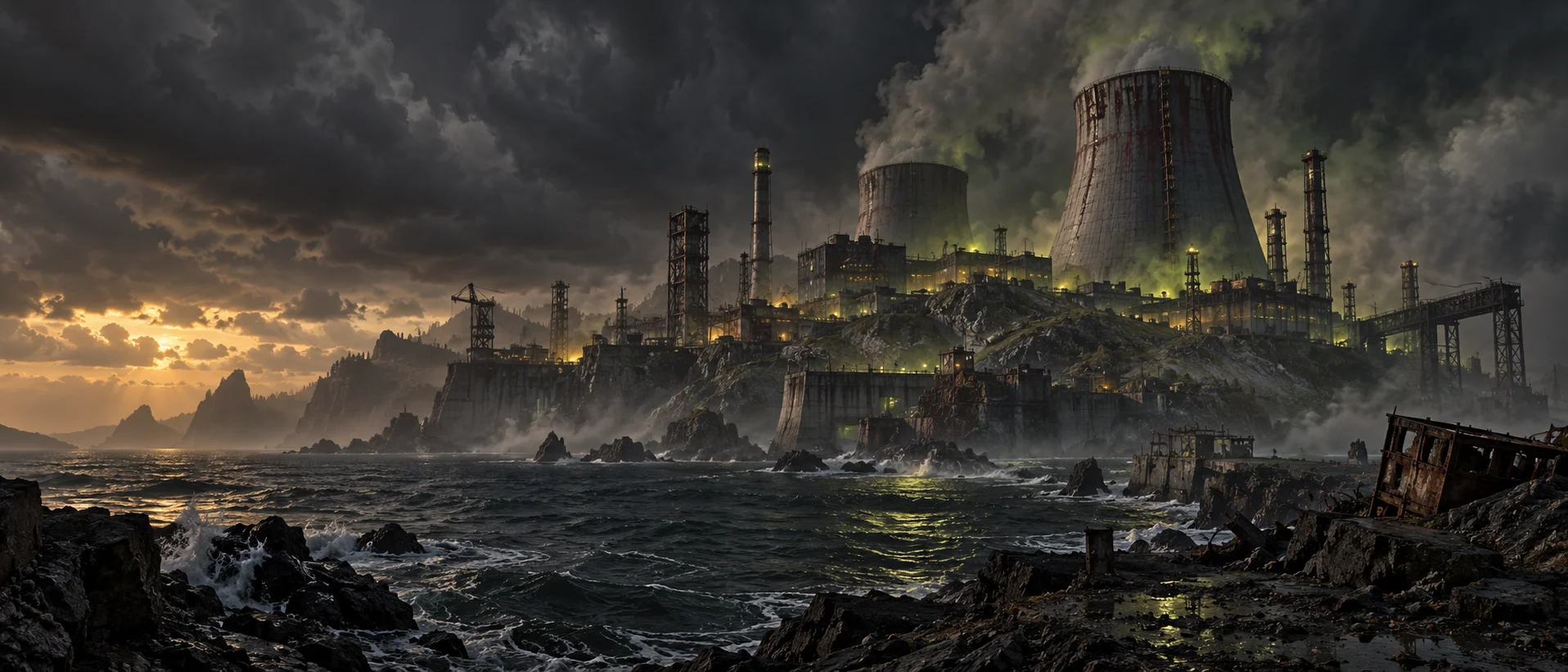
05 / INSIDE THE EXCLUSION ZONE
Atmosphere from the island.
Concept artwork — player screenshots coming next.
06 / WORLDWIDE SURVIVORS
Where are you surviving from? Choose your flag and leave your mark on the Nuke Island community board.
One flag per browser. You can change your choice anytime. No name or location tracking required.
ISLAND VISITS
—Page visits from people and bots. Repeat visits count.
Visitor choices from around the world.
YOU DON’T HAVE TO SURVIVE ALONE.
Find a team, share your best moments, get help with custom systems
and keep up with Nuke Island announcements.